Litigation Management Software

Manage Every Case & Notice.
Stay Connected with Advocates.
Never Miss a Hearing.

ComplyView Litigation Management Software gives your legal team and empanelled advocates a single, connected workspace to track every legal case and legal notice — from the day it's raised to the day it's closed. Advocates update hearings and documents from their own login, both sides get automatic reminders, and every action is recorded in a shared case log.

100%

Case Visibility

24×7

Advocate Access

Zero

Missed Hearings

Auto

Dual Reminders
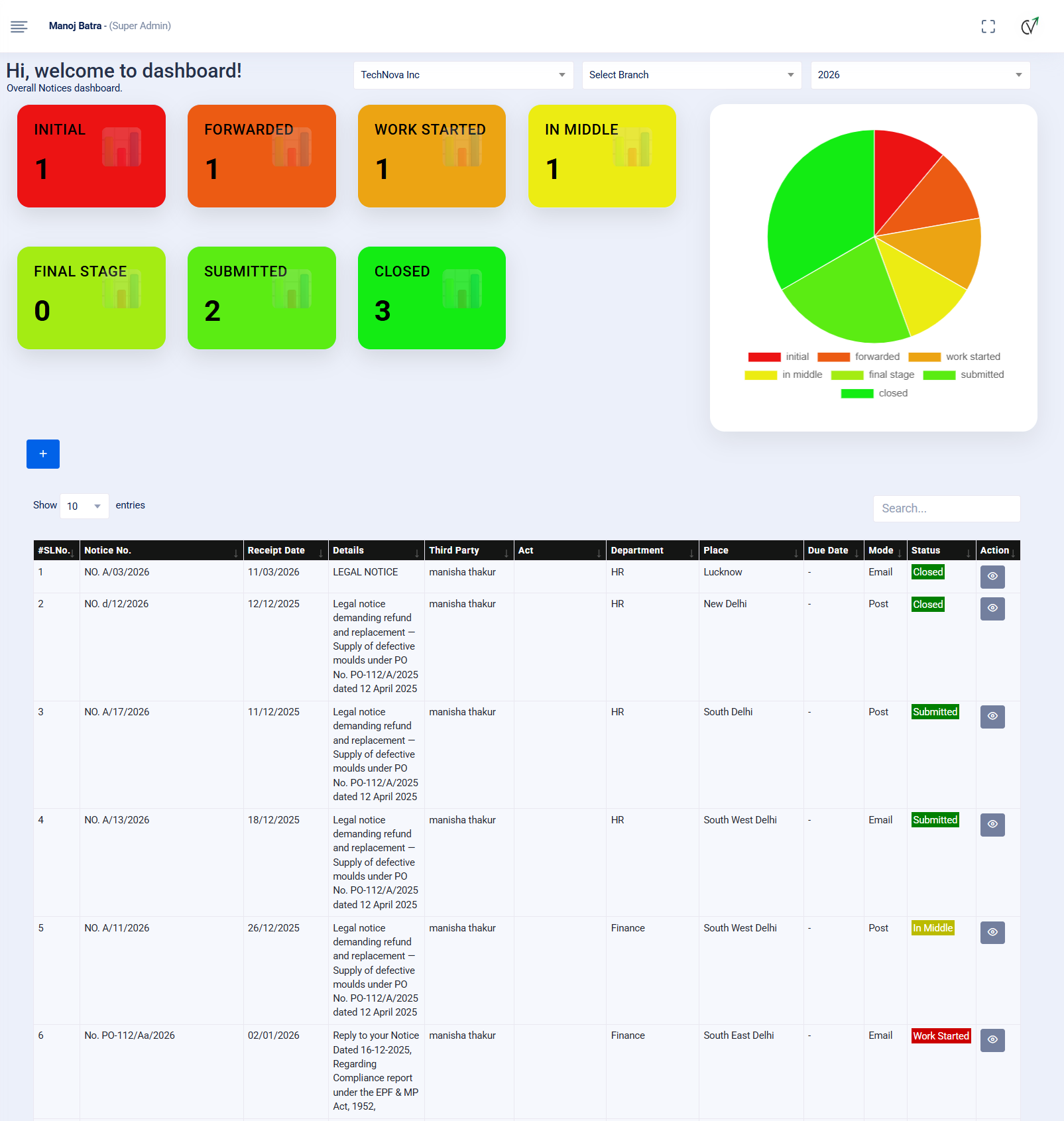
ComplyView Compliance Management Software Dashboard
Dedicated Advocate Login

Give every empanelled advocate or law firm a separate ID and password to update their own cases.

Shared Case Log

Every hearing, document, and remark builds a running conversation between company and advocate.

Visual Case Pipeline

See at a glance how many cases are Initiated, Forwarded, In Progress, and Closed.

Why Businesses Need a Litigation Management Software

Legal cases and notices are usually scattered across emails, WhatsApp messages, and individual advocate files, leaving the company with no direct visibility into what is actually happening in a case until the next hearing is already due. When information depends entirely on someone remembering to share it, hearing dates get missed, documents go untracked, and management has no real-time picture of legal risk. ComplyView's Litigation Management Software closes this gap by giving advocates and the company a shared, secure workspace, so every hearing, document, and status update is visible the moment it is recorded — not weeks later.

No Direct Visibility Into Advocate Updates

Advocates and law firm associates get their own secure login to update hearing outcomes and case status directly, instead of routing everything through emails and calls.

Documents Scattered Across Emails

Pleadings, orders, and hearing documents are uploaded straight into the case, so both the company and the advocate always refer to the same file.

Missed Hearings & Delayed Responses

Automated reminders go out to both the company and the advocate ahead of every hearing and actionable, so nothing is left to memory.

Enterprise Litigation Platform

One Workspace for Company & Advocate

ComplyView gives your in-house legal team and empanelled advocates a single connected platform to manage legal notices and litigation, with role-based logins, real-time status updates, and a complete audit trail for every case.

  • Separate Login for Advocates & Third Parties
  • Self-Updated Case & Notice Status
  • Hearing & Document Log Per Case
  • Two-Way Remarks Between Company & Advocate
  • Automated Reminders to Both Sides
  • Visual Dashboard from Initiation to Closure

100%

Case Visibility

24×7

Advocate Access

Dual

Side Reminders

Full

Case History Log
Legal Notice Tracking

Track every notice sent or received, along with replies and counter-replies.

Advocate Ownership

Every case is mapped to the responsible advocate with a dedicated login.

Real-Time Visibility

Monitor initiated, forwarded, in-progress and closed cases instantly.

Audit-Ready Case Files

Keep hearing notes, documents, and remarks organized for every case.

Litigation Workflow

A Complete Litigation Lifecycle
Built Around Company & Advocate Collaboration

ComplyView's Litigation Management Software follows a structured lifecycle that connects the company and its advocates from the moment a case or notice is raised to the day it is closed — with real-time updates, shared documents, and automated reminders at every stage.

STEP 01

Initiate

Create a legal notice or litigation case in the system with all relevant stakeholders, courts, and category details.

STEP 02

Forward to Advocate

Assign the case to the concerned advocate or law firm, who accesses it through their own dedicated login.

STEP 03

Update Hearing

The advocate logs in and updates hearing outcomes, next dates, and uploads the relevant documents.

STEP 04

Exchange Remarks

Company and advocate add remarks against the case, building a running log that both sides can refer back to.

STEP 05

Get Reminded

Both the company and the advocate receive automatic reminders for upcoming hearings and pending actionables.

STEP 06

Close the Case

Once resolved, mark the case as closed, with the complete hearing history and documents preserved for audit.

One Intelligent Platform for Company & Advocate Collaboration

From the first notice to final closure, ComplyView keeps your legal team and advocates connected with shared updates, documents, remarks, and reminders on both sides.

Schedule a Free Demo
Core Features

Powerful Litigation Management Features

ComplyView's Litigation Management Software combines advocate collaboration, real-time status tracking, document management, and dual-side reminders into one platform that keeps every legal case and notice under control.

Manage Legal Notices

Track every legal notice sent or received by the company, along with replies and counter-replies, and convert a notice into a full litigation case when required.

  • Notice-wise Status Tracking
  • Replies & Counter-Replies
  • Convert Notice to Case
  • Separate Notice Dashboard

Litigation Case Repository

Build a complete repository of legal cases mapped to stakeholders, courts, and categories, with hearing details and actionables captured against each one.

  • Stakeholder & Court Mapping
  • Case Categorization
  • Hearing Details Capture
  • Chronological Case History

Dedicated Advocate & Third-Party Login

Give every empanelled advocate or law firm a separate ID and password so they can access only their assigned cases and update them directly.

  • Role-Based Access
  • Case-Wise Assignment
  • Independent Advocate Portal
  • Controlled Data Visibility

Real-Time Status Updates by Advocates

Advocates update hearing outcomes and case status themselves from their own login, so the company always sees the latest position without chasing for updates.

  • Self-Service Status Updates
  • Hearing Outcome Logging
  • Next Date Tracking
  • No Manual Follow-Up Needed

Hearing & Document Log

Every hearing summary and document filed — pleadings, orders, or other case papers — is uploaded straight into the case, creating one shared record for both company and advocate.

  • Document Upload Per Hearing
  • Pleadings & Orders in One Place
  • Flexi Fields for Case Details
  • Single Click Access

Remarks & Communication Log

Both the company and the advocate can add remarks against a case or notice, building a running conversation and a complete, chronological case history.

  • Two-Way Remarks
  • Case History Timeline
  • Company-Advocate Thread
  • No Information Lost in Email

Automated Reminders for Both Sides

Email alerts go out to the company and the advocate for upcoming hearings, pending actionables, and updates to a case or notice, so nothing is missed by either side.

  • Dual-Side Alerts
  • Upcoming Hearing Reminders
  • Actionable Follow-Ups
  • Case & Notice Update Alerts

Visual Case Pipeline Dashboard

See every case at a glance — how many are Initiated, Forwarded to advocate, In Progress, and Closed — with reports for management review.

  • Initiated / Forwarded / In Progress / Closed
  • Real-Time Case & Notice Dashboards
  • Excel & PDF Reports
  • Jurisdiction-Wise Reporting
Enterprise Litigation Platform

Everything You Need to Manage Litigation Efficiently

ComplyView's Litigation Management Software connects your company and advocates on one platform, with real-time status updates, shared documents, dual-side reminders, and complete audit readiness for every legal case and notice.